I Have 10,000 Photos on My iPhone. Here's How I Finally Organized Them.
Folders don't work. Albums you'll never maintain don't work. Here's the approach that actually organized 10,000 iPhone photos -- by doing something meaningful with them instead of just sorting them.
TL;DR: The best way to organize 10,000 iPhone photos isn’t folders, albums, or tagging — it’s doing something with them. Upload one month at a time to an app like LifeCache, let AI group them into events, pick the highlights, and build toward a printed yearbook. The “organization” happens as a byproduct of creating something meaningful. Five minutes a month, and your camera roll goes from a graveyard of forgotten moments to a curated life timeline.
I checked my iPhone storage last year. 10,247 photos. About four years of my life, just sitting there in a single scroll that takes three full minutes to get through.
I’d tried organizing them before. Multiple times. Created albums called “Vacation 2023” and “Family Stuff.” Got about two months in and stopped. Those albums are still there, half-finished, mocking me every time I open Photos.
Sound familiar? Here’s what I learned after finally solving this.
Why is your camera roll such a mess?
Because you were never meant to organize 10,000 photos manually. Nobody was.
The average person takes 2,000-3,000 photos per year. After three or four years, you’re sitting on 10,000+ images with no system for making sense of them. Your camera roll becomes a timeline of everything — the good shots, the blurry accidents, the screenshots of addresses you needed once, the 47 nearly identical photos of your dog from one afternoon.
Apple’s Photos app does some helpful things. It groups by date and location. It recognizes faces. But it doesn’t curate. It doesn’t know that out of the 200 photos you took in July, only 15 actually matter. It just shows you all 200 in order and lets you scroll past them forever.
The result: your best memories are buried in noise. That incredible sunset from last summer? Sandwiched between a receipt photo and a blurry selfie. The birthday party that made you cry laughing? Somewhere in October, mixed with 40 screenshots of group chat conversations.
Your photos aren’t organized. They’re archived. And there’s a massive difference.
Why don’t folders and albums work?
Because they require the one thing nobody has: sustained manual effort over years.
I’ve tried every “organize your iPhone photos” guide on the internet. They all say the same thing:
- Create a folder structure (by year, by event, by person)
- Go through your photos and sort them into albums
- Delete the junk
- Maintain this system going forward
It’s great advice in theory. In practice, here’s what happens:
- You spend 2 hours sorting the first 500 photos
- You feel productive and virtuous
- You don’t touch it again for 6 months
- 1,500 new photos pile up
- The system is now behind and the idea of catching up feels overwhelming
- You abandon it
The fundamental problem: manual organization is a chore with no reward. You’re sorting photos into albums that you’ll probably never open again. The act of organizing isn’t doing anything with the photos — it’s just moving them from one bucket to another.
What about Google Photos, iCloud, or other photo organizer apps?
They help with search, not with meaning.
Google Photos is genuinely good at search. You can type “beach” or “dog” or “birthday” and find relevant photos. But search only works when you know what you’re looking for. It doesn’t surface the moments you’ve forgotten about. And it doesn’t help you do anything with those photos.
Apple Photos has Memories — auto-generated slideshows set to music. Nice for a dopamine hit, but they’re ephemeral. They appear, you watch them, they disappear. Nothing is preserved or organized in a lasting way.
Dedicated photo organizer apps (like Slidebox or Gemini Photos) help you delete duplicates and swipe through photos to sort them. Useful for decluttering, but you still end up with thousands of photos in albums you won’t revisit.
None of these solve the real problem: your photos need a destination, not just a better filing cabinet.
What actually works? Organize by doing something with them.
Here’s the mindset shift that finally worked for me: stop trying to organize your photos as a standalone activity. Instead, organize them by turning them into something.
When you upload a month’s photos to LifeCache, the organization happens automatically:
-
AI groups photos into events — A Saturday hike, a Tuesday dinner, a weekend trip. Photos that belong together get grouped together based on timestamps and location data.
-
AI picks the highlights — Out of 300 photos from March, AI selects the 15-25 that actually represent the month. The blurry ones, the duplicates, the screenshots — filtered out automatically.
-
Events get names and descriptions — “Morning at the Farmer’s Market.” “Weekend in Portland.” AI generates titles and narrative descriptions for each event.
-
You review and add context — Spend 5 minutes looking at what AI picked. Swap a photo if you want. Answer a few prompts: What was the highlight of this month? Best meal? What were you watching?

The result: your photos aren’t just organized — they’re curated. The best 200 photos from your year are grouped by event, captioned, and ready to become a printed yearbook. The other 9,800? Still on your phone, but you’ve already extracted the moments that matter.
What does the monthly method look like in practice?
It’s dead simple. Five minutes, once a month.
Step 1: Upload. Open LifeCache on your iPhone, pick the month, and upload your photos. The app pulls everything from that month in your camera roll. Takes about 30 seconds.
Step 2: AI organizes. Within a minute, AI groups your photos into events and selects highlights. You see a screen showing your month broken down into events, each with a title, photos, and a narrative description.
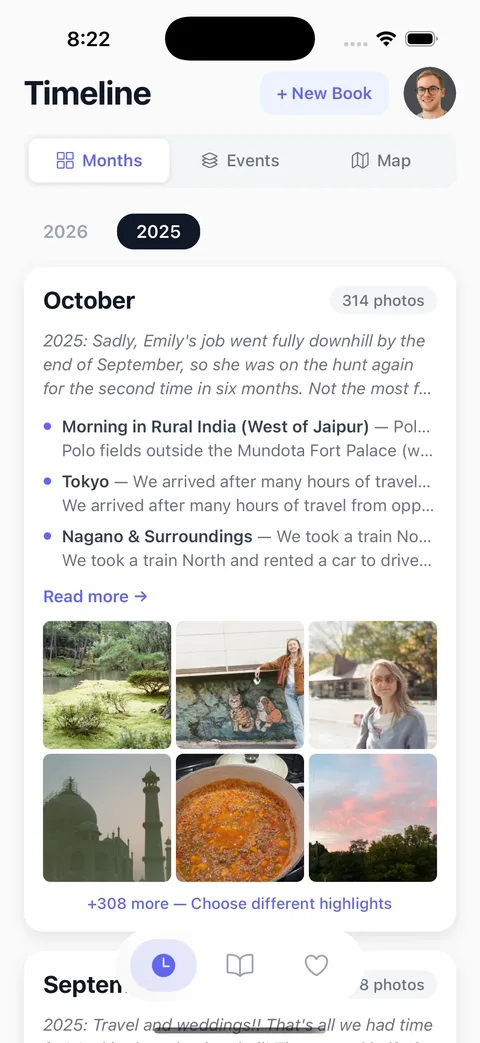
Step 3: Review. Scroll through the events. Swap a photo if AI missed your favorite. Add a note if you want. This is the 5-minute part.
Step 4: Prompts. Answer optional questions — “What was the highlight of this month?” “Favorite meal?” “What were you watching?” These take 60 seconds and capture the stuff photos can’t.
Step 5: Done. Move on with your life. Next month, do it again.
After 12 months, you have a complete year organized by month and event, with curated highlights, AI-generated narratives, and your own reflections. Print it as a hardcover yearbook, share it digitally with family, or just enjoy having a year of your life that actually makes sense when you look back at it.
What if I’m years behind? Can I organize past photos this way?
Yes. LifeCache uses the original photo timestamps from your camera roll, so you can upload photos from 2023 or 2024 and they’ll be organized correctly by month and event.
The caveat: the monthly prompts (“What was the highlight?”) are harder to answer for years that have already passed. You’ll remember the big stuff — the trips, the celebrations — but the small details fade. That’s actually the strongest argument for starting now and doing it monthly going forward. January’s photos reviewed in February, while the memories are still vivid.
If you’re sitting on 10,000 photos spanning multiple years, here’s what I’d recommend:
- Start with the current month. Build the habit first.
- Work backward one month at a time when you have a spare 10 minutes. Don’t try to do all of 2024 in one sitting.
- Accept that older years will have less context. The photos will still be organized into events and curated by AI. You just won’t have the personal reflections that make current-year yearbooks special.
Is this really “organizing” or just making a book?
Both. That’s the point.
Traditional photo organization is sorting for sorting’s sake. You create albums and folders because you think you should, but the photos just sit there in their new folders, equally forgotten.
The LifeCache approach turns organization into creation. The same act that curates your photos also builds something you’ll actually use — a yearbook you’ll flip through with your family, a digital timeline you can share, a record of your life that grows year over year.
LifeCache is an AI-powered photo book app that automatically turns your phone photos into beautiful printed yearbooks and event books. But the organization is what happens along the way. Your 10,000 photos become 200 curated highlights, grouped by event, with stories attached.
That’s not just organized. That’s meaningful.
Try LifeCache free for 90 days —>
Frequently Asked Questions
How do I organize 10,000 photos on my iPhone?
The most effective approach is organizing photos by doing something with them — uploading one month at a time to an app like LifeCache that uses AI to group photos into events and select highlights. This takes about 5 minutes per month and produces a curated timeline of your best moments, rather than just moving photos between albums.
What is the best photo organizer app for iPhone in 2026?
For basic decluttering, apps like Gemini Photos help delete duplicates. For search, Google Photos is strong. For actually turning your camera roll into something meaningful, LifeCache combines AI organization with a yearbook-building workflow — photos get grouped into events, curated, captioned, and assembled into a printable book automatically.
Should I delete old photos to organize my camera roll?
Deleting isn’t necessary for organization. The real problem isn’t too many photos — it’s that your best photos are buried in noise. AI curation tools like LifeCache extract the highlights without requiring you to delete anything. Focus on surfacing the photos that matter rather than eliminating the ones that don’t.
How do I organize photos by event on my iPhone?
Apple Photos groups by date and location but doesn’t create true event groupings. LifeCache uses AI to analyze timestamps and GPS data to automatically group photos into named events — a weekend trip, a birthday dinner, a morning hike. Each event gets a title and narrative description generated by AI.
Can I organize photos from past years, not just current ones?
Yes. Most photo organization apps, including LifeCache, use original photo timestamps from your camera roll’s EXIF data. You can upload photos from any past year and they’ll be organized correctly by month and event. The sooner you start, the more context you can add while memories are fresh.
How long does it take to organize 10,000 iPhone photos?
With a manual approach (folders, albums, tagging), expect 20-40 hours that you’ll likely never finish. With LifeCache’s AI-powered monthly method, it takes about 5 minutes per month going forward. For existing backlog, you can process one past month at a time in about 10 minutes each.