How to Make a 2027 Family Photo Calendar From Your Phone
A step-by-step guide to making a 2027 family photo calendar from your iPhone: choosing 13 photos without scrolling for hours, picking a size, and when to order so it arrives before the holidays.
Updated October 2026.
Quick answer: A family photo calendar needs 13 photos (12 months plus a cover). The slow part isn’t ordering it. It’s scrolling a year of camera roll to choose them. In the LifeCache iPhone app, Fill from my year does the choosing: it puts the best photo of each month on that month’s page and the best photo of the year on the cover, and you swap any you’d rather change. The wall calendar is $17.99 (A5) or $19.99 (A4). For holiday gifts, order by the end of November with Standard shipping (5–7 business days), or pay for Express or Overnight after that.
Every December a lot of people decide to make a photo calendar, open their camera roll, and close it again twenty minutes later somewhere in March.
The printing is easy. Any app will print 13 pages. What takes the time is the choice: thirteen photos out of several thousand, each one good enough to look at for a month, spread across the year so it doesn’t turn into “eleven photos of the beach trip and two of everything else.”
This guide covers how to choose them quickly, which size to buy, how to check your photos will print sharp, and when to order so it arrives before the holidays.
What a photo calendar needs (and why it takes longer than you think)
| What you need | Where people get stuck | |
|---|---|---|
| Photos | 13 (12 months + cover) | Choosing them. A typical year is thousands of photos. |
| Spread | One per month | Busy months crowd out quiet ones |
| Quality | Sharp at the print size | Screenshots and photos saved from messages |
| Orientation | Matches the page | Tall photos on a wide page, or the reverse |
| Timing | Arrives before the date you need it | Ordering in mid-December |
The first two rows are the real work. The last three are a few minutes each.
Step 1: Choose one photo per month (the fast way)
The rule that makes a calendar feel like your year is simple: January’s page gets a photo from January. Seasons line up, and the calendar quietly turns into a look back at the year as well as a planner for the next one.
The hard way to follow that rule is to scroll your camera roll month by month and pick a favorite from each. If you take a lot of photos, that’s an evening.
The fast way is to let something else do the first pass. I built LifeCache to sort a camera roll into months and events and score which photos are worth keeping, and the Print Shop uses that work. When you choose the Wall Calendar and tap Fill from my year, it:
- takes the most recent year that has photos in most months
- puts the highest-rated photo of each month on that month’s page
- puts the best photo of the whole year on the cover
- leaves any month without photos empty, so you can choose something yourself
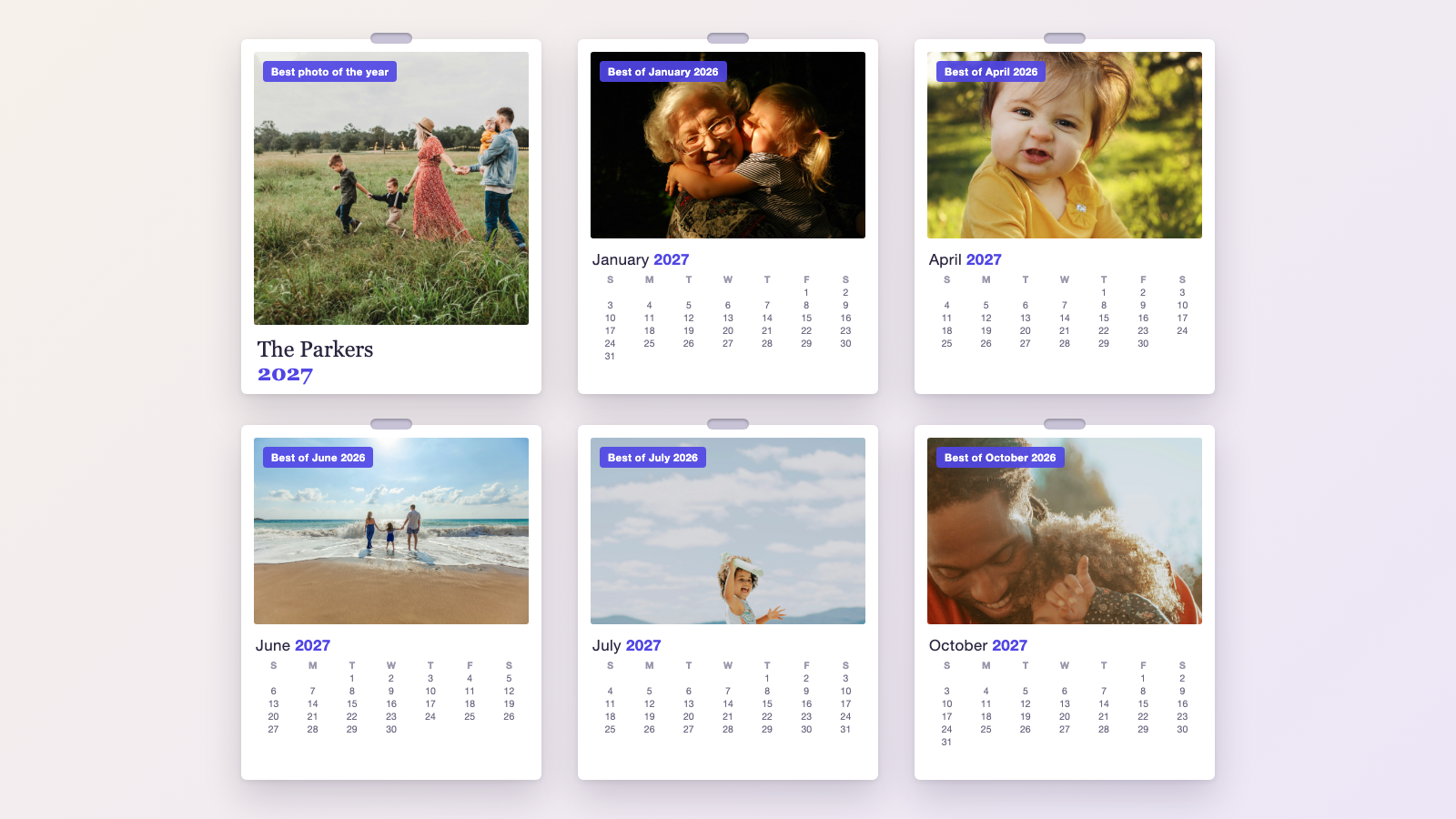
You’ll still want to look at every page. The AI is good at “sharp, well-lit, people looking at the camera” and has no way of knowing that the slightly blurry photo from August is the one where your daughter lost her first tooth. Swap freely. Fill from my year only replaces the starting point.
If you’re choosing by hand, a few rules of thumb save time:
- Pick faces over scenery. A calendar hangs for a month. People look at the faces.
- Use the cover for the best photo of the whole year, not the first one in January.
- Mix group shots and close-ups. Twelve group photos in a row read as a yearbook.
- Thin month? Borrow. A great photo from late October beats a blurry one from early November.
Step 2: Choose a size
LifeCache prints two wall calendar sizes:
| Size | Dimensions | Price | Best for |
|---|---|---|---|
| A5 | 5.8 × 8.3 in | $17.99 | Desks, small walls, mailed gifts, ordering several copies |
| A4 | 8.3 × 11.7 in | $19.99 | Kitchen and office walls, anywhere it’s read from a few feet away |
For one calendar for your own kitchen, A4 is the obvious choice for a $2 difference. For a stack of gifts, A5 keeps the cost and the parcels smaller.
LifeCache members get 20% off everything in the Print Shop, and non-members who’ve already bought a printed book get 20% off their first shop order.
Step 3: Check every photo will print sharp
Recent iPhone photos are far larger than a calendar page needs, so straight-from-the-camera photos are fine. The ones to watch are:
- Screenshots and photos saved from a text or WhatsApp, which are often compressed to a fraction of the original
- Heavy crops, where one face from a big group shot fills a whole page
- Old photos from an earlier phone
Two things in LifeCache help here. It uses the full-size original from your phone when that phone took the photo, rather than a smaller copy. And it shows a live preview of each page with your photo in place, so a crop that cuts off someone’s head is obvious before you pay.
For the numbers behind “how big is too big,” see how big you can print an iPhone photo.
Step 4: Match orientation to the page
Calendar pages have a fixed shape. A tall photo on a wide page loses the top and bottom, and the reverse loses the sides. When you swap a photo, look at the preview and drag the crop so the important part stays in frame. Faces near the edge of a photo are the most common thing to lose.
Step 5: Order in time for the holidays
Printed calendars are one of the most common holiday gifts, and the most common way to miss is ordering a week before Christmas with the slowest shipping.
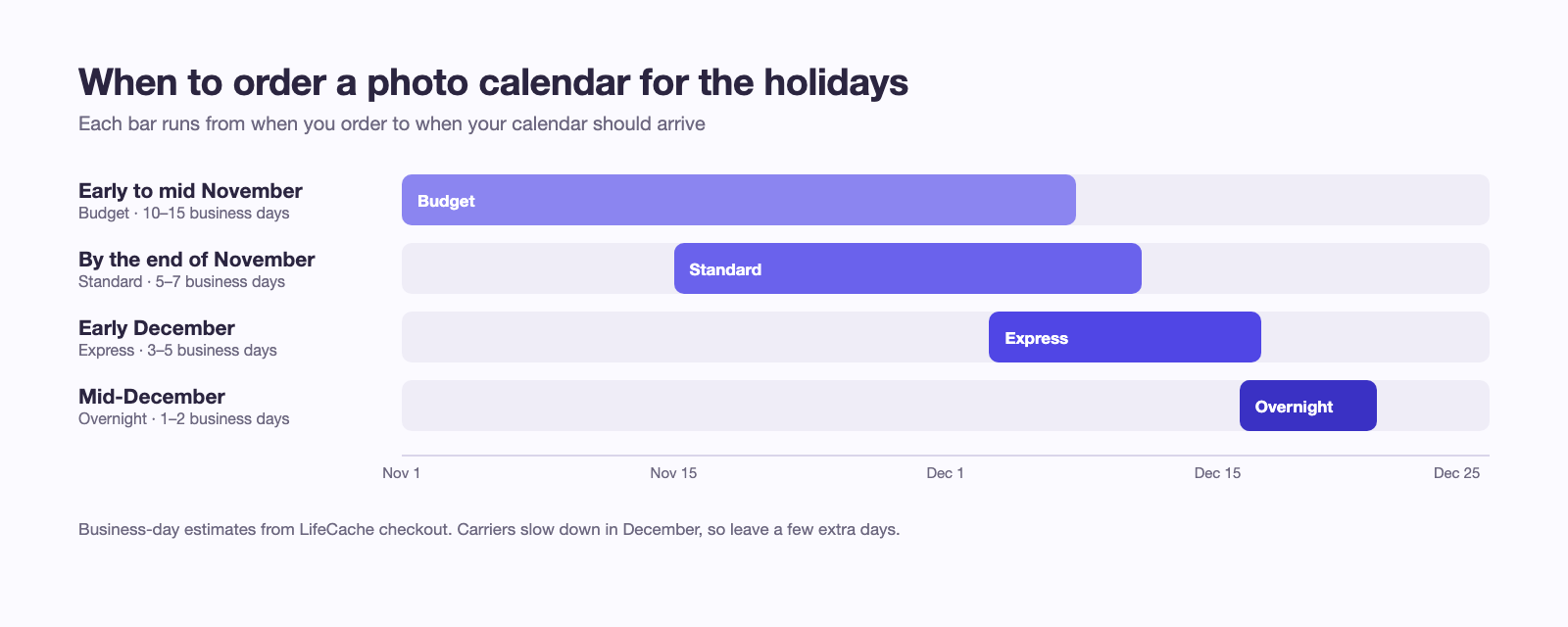
LifeCache has four shipping speeds, priced at checkout:
| Shipping | Estimated delivery |
|---|---|
| Budget | 10–15 business days |
| Standard | 5–7 business days |
| Express | 3–5 business days |
| Overnight | 1–2 business days |
A practical plan for holiday gifts:
- Early to mid November: order with Budget shipping and save on shipping.
- By the end of November: Standard shipping leaves a comfortable buffer.
- Early December: switch to Express.
- Mid-December onward: Overnight, and accept you’re cutting it close.
These are business days, and carriers slow down in December. Treat each estimate as the shortest it’s likely to take, not a guarantee, and leave a few extra days if the gift has to be posted on again after it reaches you.
Calendars for grandparents
A calendar might be the best-value gift for grandparents. It costs less than a book, and it hands them a new photo of the grandkids every month for a year instead of all at once on Christmas morning.
Two ideas that work well:
- One calendar, several copies. Make it once, order a copy for each set of grandparents.
- A calendar of them. Fill it with photos of the grandparents with the kids from this year. They rarely have those, because they’re never the ones holding the camera.
If you’re shopping for more than a calendar, the photo gift ideas for grandparents list covers books, prints and framed photos at different prices.
Calendar or photo book?
They solve different problems:
| Photo calendar | Photo book | |
|---|---|---|
| Photos | 13 | Dozens to hundreds |
| Lasts | One year on the wall | Years on a shelf |
| Best at | A small, steady reminder | The whole story of the year |
| Effort | Minutes with Fill from my year | An evening, or less if the AI builds it |
If you’re already making a family yearbook in LifeCache, the calendar comes almost for free: the same photos are already sorted, and the best of each month is already picked. Plenty of families do both, the book for the shelf and the calendar for the kitchen.
The short version
- Open the Shop tab in LifeCache and choose Wall Calendar.
- Tap Fill from my year and look at every page.
- Swap anything the AI got wrong, and check the crops in the preview.
- Choose A4 for your wall or A5 for gifts.
- Order by the end of November with Standard shipping, or pay for faster shipping later.
Everything the Print Shop makes, from calendars to canvas, is on the Print Shop page.
Make your 2027 calendar in LifeCache →
Frequently Asked Questions
How do I make a photo calendar from my iPhone photos?
Choose 13 photos (one for each month plus a cover), pick a size, check each photo fits its page, and order from an app that prints calendars. In the LifeCache iPhone app, open the Shop tab, choose Wall Calendar and tap Fill from my year: it places the best photo of each month on that month’s page and the best photo of the year on the cover, and you swap any you don’t like. A5 (5.8×8.3 inches) is $17.99 and A4 (8.3×11.7 inches) is $19.99.
How many photos do I need for a photo calendar?
Thirteen: one for each of the twelve months and one for the cover. The common mistake is choosing them in the order they appear in your camera roll, which over-represents the busiest months. Choose one strong photo from each month instead, so the calendar reads as the whole year.
What size photo calendar should I get?
A4 (8.3×11.7 inches, $19.99 in LifeCache) for a kitchen or office wall, where it’s read from a few feet away. A5 (5.8×8.3 inches, $17.99) for a desk, a small wall space, or a gift that will be mailed. If you’re printing several for grandparents, A5 keeps the cost and the shipping weight down.
When should I order a photo calendar for Christmas?
Leave room for the print and the delivery. LifeCache offers Budget (10–15 business days), Standard (5–7), Express (3–5) and Overnight (1–2) shipping. Ordering by the end of November with Standard shipping leaves comfortable margin before the holidays; after that, choose Express or Overnight. Carriers get slower in December, so treat the business-day estimates as a floor, not a promise.
Should the photo for each month be from that month?
It’s the best default. A January page with last January’s photo means the calendar doubles as a look back at the year, and seasons line up (snow in winter, beach in summer). Fill from my year in LifeCache works this way. Break the rule when a month was thin on photos: a strong photo from a neighboring month beats a blurry one.
Will my iPhone photos be sharp enough for a calendar?
Almost always. Even the A4 calendar page is small compared to what a recent iPhone photo can print. Problems come from crops of crops: a screenshot, a photo saved from a message, or a small part of a group shot blown up. LifeCache uses the full-size original from your phone when that phone took the photo, and shows a live preview of each page before you order.
Can I make photo calendars for grandparents too?
Yes, and it’s one of the best uses of one: a page a month means they see a new photo of the grandkids every few weeks for a year. Make one calendar, then order extra copies, or make a second version with photos of the grandparents themselves. A5 at $17.99 is the usual choice for mailed gifts.