Travel Photo Book: How to Turn a Trip Into a Beautiful Book (Without the Work) (2026)
You came home from an amazing trip with 800 photos and zero energy to sort them. Here's how to turn travel photos into a printed book in minutes — AI handles the curation, layout, and grouping.
TL;DR: You take 500-800 photos on a trip and do nothing with them. The sorting feels overwhelming, the motivation fades, and those photos sit in your camera roll forever. The fix: upload your trip photos to an Event Book, let AI group them by day and location, review what it chose, and print a dedicated book for that one trip. LifeCache is an AI-powered photo book app that automatically turns your phone photos into beautiful printed yearbooks and event books — including single-trip travel books.
I came back from a two-week trip last year with 743 photos. I was going to make a photo book. I was absolutely going to make a photo book.
That was 14 months ago. The photos are still in my camera roll, slowly getting buried under thousands of newer ones.
This is the travel photo problem, and almost everyone has it.
Why do most travel photo books never get made?
Because the window closes fast.
You get home from a trip with 500+ photos and a burst of motivation. “I’m going to organize these while I still remember everything.” But then you unpack. Laundry piles up. Work emails hit. Within a week, the motivation is gone. Within a month, you’ve forgotten which restaurant was in which city.
Traditional photo book tools make this worse. Open Shutterfly. Stare at a blank canvas. Upload 800 photos. Start dragging them onto pages one by one. Realize you need to sort chronologically first. Give up after 30 minutes and 6 pages.
The average travel photo book takes 15-20 hours to design manually. That’s not a fun weekend project. That’s a part-time job.
The only people who finish travel photo books are the ones with an unreasonable amount of patience — or a tool that eliminates the work.
What’s an Event Book, and why is it perfect for trips?
An Event Book is a dedicated photo book for a single occasion — a trip, a wedding, a reunion. Instead of trying to capture an entire year, it focuses on one thing and does it well.
For travel, this is the right format. Your trip to Portugal doesn’t need to share pages with your Tuesday lunch photos. It deserves its own book.
Here’s how it works with LifeCache:
- Create an Event Book for your trip
- Upload your photos from that trip — select them from your camera roll by date range
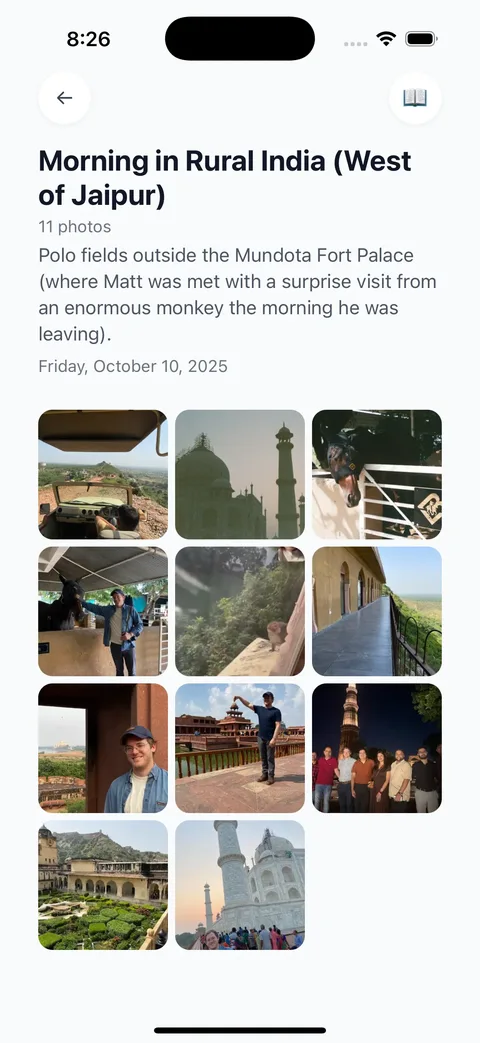
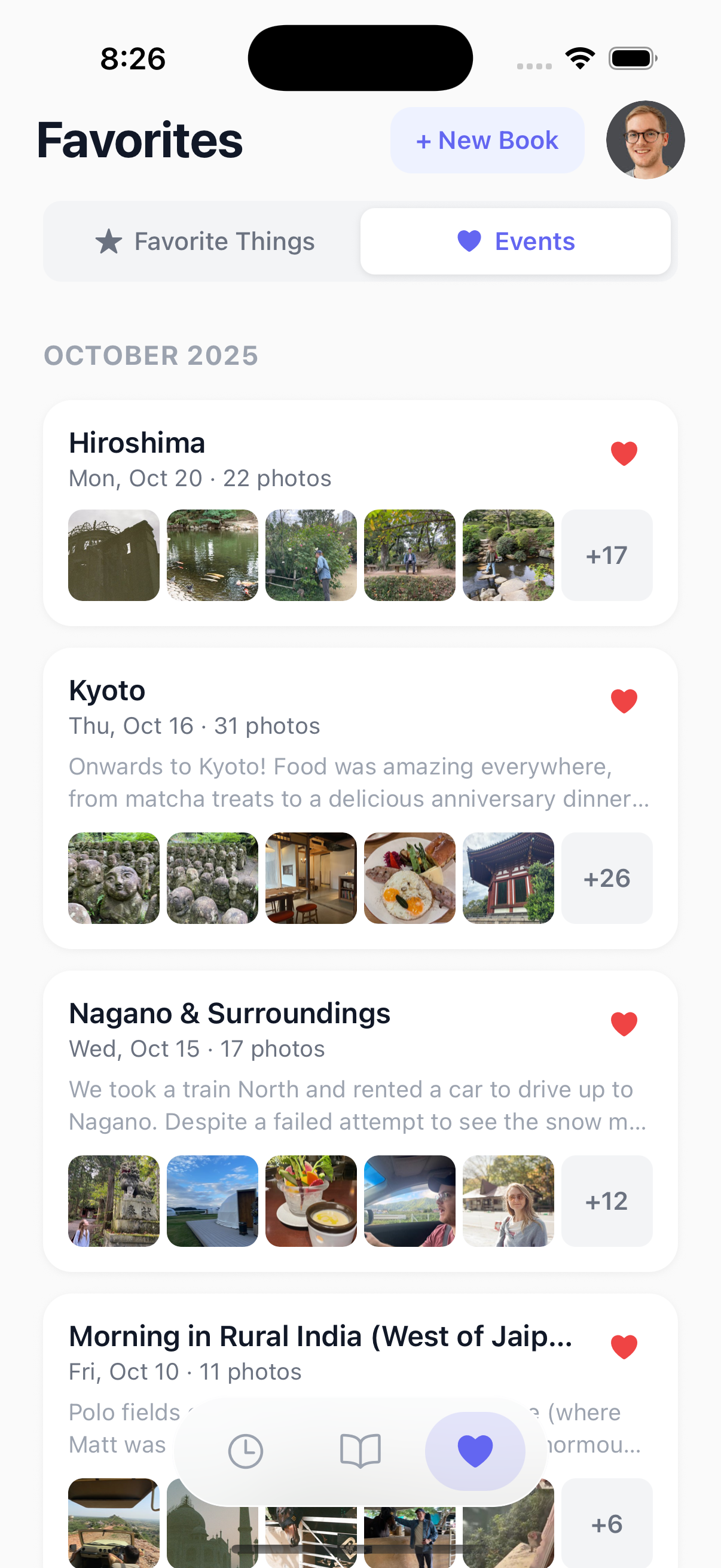
- AI groups them automatically — by day, by location, by activity. “Day 1: Lisbon arrival.” “Day 3: Sintra day trip.” “Day 5: Porto wine tasting.”
- Review and add context — swap a photo, add a caption, answer prompts about best meals and favorite moments
- Print or share — order a hardcover book or share a digital version with your travel companions
The entire process takes about 15-20 minutes, not 15-20 hours.
How does AI group travel photos by location and day?
This is where it gets interesting. LifeCache’s AI looks at three things in your photos:
Timestamps: When were photos taken? A 6-hour gap between clusters usually means a new activity or location.
Location data: Your phone embeds GPS coordinates in every photo. AI uses this to detect when you’ve moved to a new place — from the hotel to the museum, from the city to the countryside.
Context patterns: Photos taken in rapid succession (12 photos in 2 minutes) are probably the same scene. Photos spread across an afternoon with location changes are different activities.
The result: your 600 trip photos get organized into 15-25 events, each with a title, a time range, and curated highlights. “Morning at the Acropolis” contains your best 8 photos from that visit, not all 47 you took.

What context should you add to a travel book?
Photos capture what things looked like. They don’t capture what things felt like.
The best travel books include context that you’ll want to remember in 10 years:
- Best meal of the trip — the name of the restaurant, what you ordered, why it was memorable
- Unexpected moments — the wrong turn that led somewhere amazing, the conversation with a stranger
- Practical details — where you stayed, how you got around, what you’d do differently
- Sensory memories — what it smelled like, what the weather was, the sound of the market
LifeCache’s prompts capture this automatically. After you upload your trip photos, you get prompted to record highlights, favorites, and reflections. Two minutes of writing that turns a photo book into a travel journal.
How is this different from making a travel book on Shutterfly?
| Manual (Shutterfly, Mixbook) | AI Travel Book (LifeCache) | |
|---|---|---|
| Time to create | 15-20 hours | 15-20 minutes |
| Photo sorting | Manual drag and drop | AI groups by day + location |
| Captions | You write everything | AI-generated, you edit |
| Event grouping | You decide the sections | Automatic by time + place |
| Context capture | None (photos only) | Prompts for meals, highlights, memories |
| Best for | Full design control | Beautiful book without the work |
Shutterfly gives you a blank canvas and unlimited control. That’s great if you have 20 hours and enjoy design work. If you just want your trip photos in a beautiful book before the memories fade, AI handles it.
Can you share a travel book with your travel companions?
Yes — and this is one of the best use cases.
Generate a private share link and send it to everyone who was on the trip. They can browse the digital book — no account needed. If they want their own printed copy, they can order one directly.
Think about it: instead of a shared Google Photos album that everyone looks at once and never opens again, you have an actual curated book. With context. With narrative. Something worth keeping.
How do I get started with a travel photo book?
Sign up for LifeCache and create an Event Book for your trip. Upload your photos — even from a trip months ago. The AI will organize everything by day and location, pick the highlights, and show you what your book looks like.
Plans start at $50/year with a 90-day free trial and a $25 print credit. Hardcover books start at $39.99.
You can also use LifeCache as a yearbook for your whole year — every trip, every event, every month documented. But if you’ve got 800 photos from one trip sitting in your camera roll right now, an Event Book is the fastest way to do something with them.
The photos aren’t getting any fresher. The memories aren’t getting any sharper. Build the book now.
Frequently Asked Questions
How long does it take to make a travel photo book with LifeCache?
About 15-20 minutes total. Upload your trip photos (1-2 minutes), let AI group them by day and location (automatic), review and add context (10-15 minutes), and your book is ready to print. Compare that to 15-20 hours with traditional manual photo book tools.
Can I make a travel photo book from an old trip?
Yes. LifeCache uses the EXIF data embedded in your photos (timestamps and GPS coordinates) to organize them, regardless of when you upload. A trip from 2 years ago works just as well as one from last week — the AI groups by the original photo data, not upload date.
How much does a LifeCache travel photo book cost?
LifeCache plans start at $50/year (Individual) with a 90-day free trial and $25 print credit included. Hardcover Event Books start at $39.99. You can also share a digital version for free before deciding to print.
What’s the difference between a yearbook and an Event Book?
A yearbook captures your entire year month by month — 12 months of highlights, events, and reflections in one book. An Event Book is a dedicated book for a single occasion like a trip, wedding, or reunion. For travel, Event Books let you give one trip the full treatment it deserves.
How does LifeCache organize travel photos automatically?
LifeCache’s AI analyzes timestamps and GPS location data from your photos to group them into events. It detects time gaps and location changes to create natural groupings — “Morning at the market,” “Afternoon beach,” “Dinner in the old town.” Each event gets AI-generated titles and descriptions that you can edit. Learn more about how AI organizes photos.
Can I include photos from multiple phones on the same trip?
Yes. If you’re traveling with a partner or group, everyone can upload their photos to the same Event Book. LifeCache merges them chronologically using timestamps, so you get a unified book with the best shots from everyone’s camera roll.